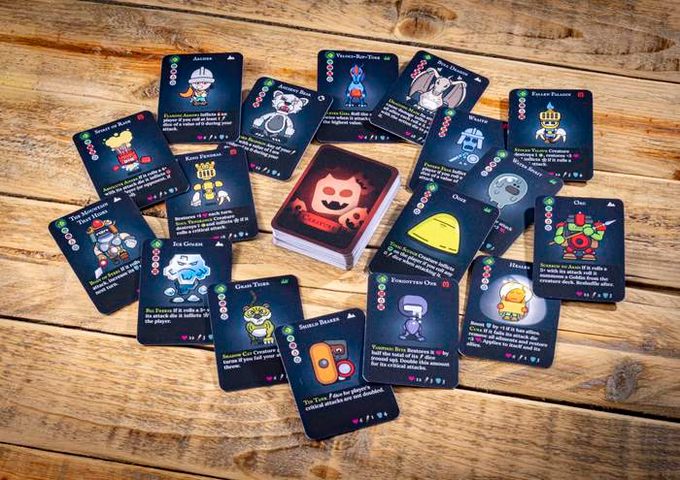
Print and play games are board and card games you download as a PDF, print at home and cut out yourself. It sounds like a craft project, and it can be if you want it to be, but most games only need a printer, a pair of scissors and an evening. Get a few things right and your home-printed cards will shuffle and last almost as well as a boxed game.
This is how I'd go about it, from choosing paper to cutting, sleeving and storing your cards. I'll use TerraClash Lite, the free print and play version of my own game, as a worked example near the end, but everything here applies to any print and play game.
What you need
A printer. An ordinary home inkjet or laser printer is fine.
Paper or card. A4 printer paper works. Thin card is nicer. More on this below.
Something to cut with. Scissors will do. A paper trimmer, or a craft knife with a metal ruler and cutting mat, gives straighter edges.
Dice and tokens. Most games use ordinary six-sided dice. Coins, buttons or beads make good tokens.
A pencil and eraser for roll and write games, or for keeping track of scores.
Optional extras: card sleeves, a corner rounder and a small box or tin to keep it all in.
Step 1: Read the files before you print
Open the PDF and have a look before you send anything to the printer. Check:
How many pages are cards and how many are rules. You may want to print the rules on plain paper and the cards on card.
Whether the cards have backs. If the backs are on a separate page, the game expects double-sided printing. Some games skip backs entirely, which makes life easier.
Whether there's a printer-friendly version. Many designers include a version with lighter backgrounds or black and white art to save ink.
The page size. Many games come in both A4 and US Letter. Pick A4 if you're in the UK.
It's also worth reading the rules before you print. If a game turns out not to be your kind of thing, you've saved yourself the ink and the cutting.
Step 2: Get the printer settings right
This is the step that catches most people out. In your print dialogue:
Print at "Actual size" or 100%. Not "Fit to page" or "Shrink oversized pages". Scaling makes the cards slightly smaller, so they won't fit standard sleeves and backs won't line up with fronts.
Choose the right paper type. Telling the printer you're using card or heavy paper usually slows it down and improves the result.
Print one test page first. Measure a card with a ruler and compare it to the size the rules give. It takes a minute and saves a lot of wasted card.
Step 3: Choose your paper or card
Paper weight is measured in grams per square metre (gsm). Ordinary printer paper is around 80gsm. As a rough guide:
Weight
What it's like
Good for
80 to 100gsm
Standard printer paper
Rule books, roll and write sheets, cards you'll put in sleeves
120 to 160gsm
Thicker paper, still flexible
Cards without sleeves for a game or two
200 to 300gsm
Thin card, close to a real playing card
Cards you'll shuffle a lot, player boards
Before you buy card, check the maximum paper weight your printer can handle. You'll find it in the manual or on the manufacturer's website. Many home printers cope better with heavier card through a rear or manual feed tray than the main tray, and feeding one sheet at a time helps avoid jams.
Matt card is generally easier to work with than gloss: it shows less glare under a lamp, and inkjet ink dries more reliably on it.
Step 4: Deal with double-sided cards
If your cards have printed backs, you have three options:
Print double-sided. Use your printer's duplex setting or feed the sheet back through by hand. Print a test sheet first and hold it up to a window to check the fronts and backs line up. Even a couple of millimetres out will show once you cut.
Print fronts and backs separately and glue them. Print each on thin paper, line them up and stick them together with a glue stick or spray adhesive. This makes a thick, sturdy card and hides any misalignment, but it takes time.
Skip the backs and use sleeves. Sleeves with a solid coloured back make every card look the same from behind, so you only need to print the fronts.
Step 5: Cut out the cards
Cutting is the part that takes longest, so put something on to listen to. A few things make it quicker and neater:
Cut the long lines first. Cut each sheet into strips, then cut the strips into cards. It's faster than cutting round each card.
Use a paper trimmer if you have one. A rotary or guillotine trimmer gives straight edges and identical cards. With a craft knife, always use a metal ruler and a cutting mat.
Cut just inside the line. If the cards have a thin border, cutting slightly inside it leaves no white edges.
Round the corners if you like. A corner rounder punch is cheap and makes cards feel much more like the real thing. It also stops corners fraying.
Step 6: Sleeve your cards
Sleeves are the single biggest upgrade you can make to a print and play game. A card printed on plain paper and slipped into a sleeve in front of an old playing card shuffles almost like a bought deck, and it costs far less than buying card stock.
🎲 Want to try a solo card and dice RPG tonight? Get TerraClash Lite free: a print-and-play game you can play with ordinary dice.
Many games use standard poker-sized cards, 63 x 88mm. Sleeves sold as "standard" size, usually around 66 x 91mm, fit those. Check the card size in your game's rules first, though, because some use smaller or square cards.
If you don't want to sleeve, laminating is another option for cards and player boards you'll use a lot, though laminated cards are harder to shuffle.
Step 7: Gather dice and tokens
Most print and play games use ordinary six-sided dice. If you don't have enough, an old board game from a charity shop is usually a cheaper source than buying new. Different colours are useful when a game uses dice for different jobs.
For tokens, look round the house before you buy anything. Coins, buttons, beads, small pasta shapes and the odd counter from another game all work. A pencil and a scrap of paper can track scores or health in most games.
Step 8: Store it
A small tin, a tuck box or a zip-lock bag keeps everything together. Fold the rule book and keep it in with the cards, so the game is ready to go next time.
Worked example: printing TerraClash Lite
TerraClash Lite is a free fantasy card and dice RPG for 1 to 2 players. Here's how I'd go from download to first game.
Get the files. Put your name and email in at terraclash.co.uk/lite and the download link comes to your inbox. You get 6 card sheets and a 10-page rule book.
Try it first if you like. The same game plays free in your browser, so you can learn the rules on screen and see whether you enjoy it before printing.
Print the rule book on plain paper and the 6 card sheets on A4 paper or card, at actual size.
Cut out the cards. You'll have 2 heroes (the Warrior and the Druid), 13 creatures, King Fendral, 6 terra cards and a starter set of items and spells.
Find your dice. You need ordinary six-sided dice: one action die and up to five wound dice. I'd use a different colour for the action die so you can tell them apart at a glance.
Grab a pencil. It helps to keep track of your hero's durability and terra coins.
Start exploring. Turn over a terra card, see what lives there, and fight it. Solo, you need 6 terra coins to challenge King Fendral. In co-op, both heroes play on the same side, pool coins and need 12 between them.
A game takes about an hour once you know the rules.
Common mistakes to avoid
Printing at "Fit to page". The cards come out slightly too small and backs won't line up.
Printing everything on card. The rule book is easier to read and fold on plain paper, and it saves card.
Forcing heavy card through the printer. Check the maximum weight first. A jammed sheet of 300gsm card is not fun to remove.
Cutting everything in one sitting. Cut what you need for your first game, play it, and finish the rest once you know you like it.
Where to find games to print
Once you've printed one game, you'll want another. I've put together a few lists to get you started:
Beyond those, PnP Arcade and itch.io both have large collections of print and play games, many free or name your own price.
Questions
How do print and play games work?
You download the game as a PDF, print it at home, cut out the cards or boards, and play with your own dice and tokens. Some are a single sheet you fill in with a pencil; others are a full deck of cards.
What paper is best for print and play cards?
Thin card of around 200 to 300gsm feels closest to a real playing card, if your printer can take it. If not, ordinary 80gsm paper in a sleeve, with an old playing card behind it, works just as well.
Do I need a colour printer?
No. Many games include a black and white or printer-friendly version, and most work fine printed in greyscale. Colour helps where a game uses it to tell cards apart, so check the rules.
What size sleeves do I need for print and play cards?
For standard poker-sized cards (63 x 88mm), standard sleeves of around 66 x 91mm fit. Check the card size in your game's rules, as some games use other sizes.
Can I get a print and play game printed professionally?
Some designers allow it for personal use and some don't, so check the licence or the notes that come with the game. Many free games are licensed for personal, non-commercial use only.
Try it with TerraClash Lite
If you want a first print and play project, TerraClash Lite is a good one to start with: 6 card sheets, ordinary dice and about an hour to play. Put your name and email in at terraclash.co.uk/lite and the download link comes straight to your inbox, or play it in your browser first with nothing to print.
Pick the Warrior or the Druid, explore a new land every turn and fight creatures with cards and dice. Six card sheets and an eight-page rule book, free to print at home. Solo or two players.